
Save $10,000* per year by switching to AirMatch
Most contractors pay for five or six separate software tools that each do one part of the job, and none of them talk to each other. Put in what you pay today and see the difference for yourself.
* Savings vary. That figure is the example below: $1,131 a month across 7 software tools, against AirMatch at $289 a month for 5 people on annual billing. What you actually save depends on what you pay today, how many people need an account, and which tools you replace. Put your own numbers in below to see yours.
What are you paying today?
Per monthType what you pay. Leave anything you do not pay for at zero.
 AirMatch pricing
How many people need an account?
- Per person with AirMatch
- $57.80
- Per person today
- $226.20
You would save
$10,104
a year
$842 a month
7 separate software tools become one. One bill, one login, and the job, the proposal, and the invoice all agreeing with each other.
Every plan includes every feature. Only the number of people changes the price, and the cost per person falls as you add them: $289 a month covers up to ten.
What each of those becomes.
Consolidating only counts if the one app does the work.
- Scheduling and dispatch
- A live dispatch board with per-tech lanes, drag to schedule or reassign, conflict and skill warnings, an unscheduled queue, and technician GPS on a map.
- Load calculations
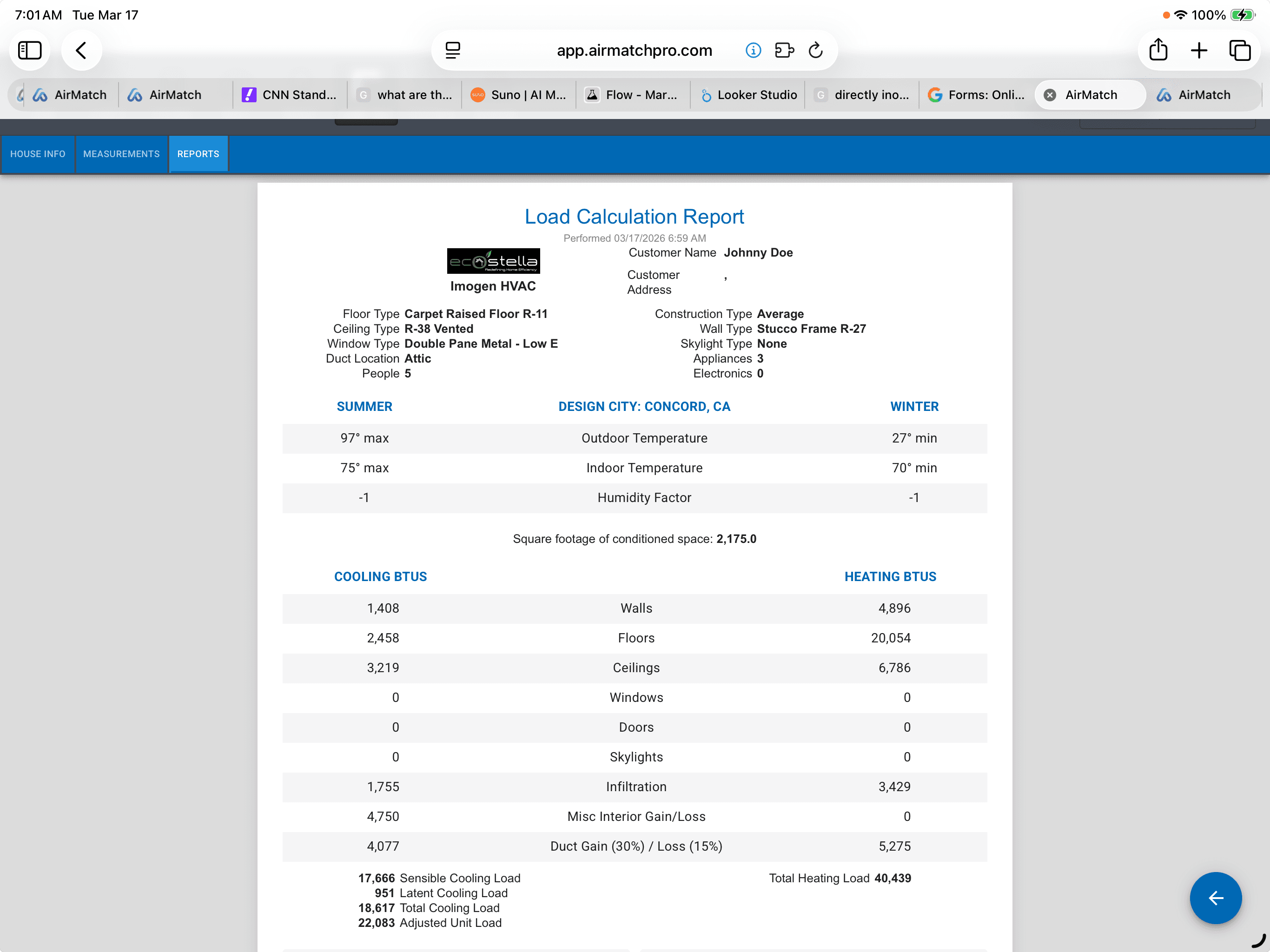
- LaserCalc, room by room, on a phone in the driveway. Design temperatures for every US city, and a report you can hand to the homeowner or the permit office.
- Proposals and sales presentation
- AHRI verified matchups, Good / Better / Best in one document, financing and rebates priced in, and a homeowner view that works on a phone.
- E-signature
- The homeowner signs the proposal where they read it. Nothing to send, countersign, or chase.
- Invoicing and payments
- Invoices built from the job that sold, paid online or in the driveway, with what is still owed visible without opening anything.
- Follow up and reviews
- Appointment reminders, en route messages, and review requests that fire off the job itself, plus replies handled in one place.
- Job photos and video
- Photos and video captured against the job itself, through checklist photo fields that can be marked required, so the documentation is attached to the work rather than living in a separate app.
- Maintenance agreements
- Agreements that book their own visits, show you who is due and who has lapsed, and bill on their own schedule.
- Customer portal and messaging
- A portal where the homeowner sees their proposal, visits, invoices, and agreement, and can book their own appointment.
Quick tour
See the whole thing in six minutes.
The one app, end to end. The video loads only when you press play, so nothing tracks you before then.
The money is the smaller half of it.
The reason to consolidate is not the invoice. It is that one record carries the job from the first knock to the last payment, so nobody re-enters the customer, the scope, or the price a second time.
 Step 1
Size it
LaserCalc room by room on a phone, with design temperatures for every US city and a report the homeowner and the permit office both accept.
 Step 2
Sell it
AHRI verified matchups, Good / Better / Best in one document, financing and rebates priced in, signed where the homeowner reads it.
 Step 3
Schedule it
The sold job lands on the dispatch board with the exact scope and equipment that was sold, ready to drag onto a qualified tech.
 Step 4
Do it
Required checklists gate the install, so the job cannot be closed with the photos and readings missing.
 Step 5
Bill it
The invoice is built from the job that sold, paid online or in the driveway.
 Step 6
Follow it
Reminders, en route messages, review requests, and maintenance visits that book themselves.
Every one of those steps is a place a separate tool makes you stop, export something, and type it in again. That is the cost that never shows up on a subscription line.
Everything the one app actually does.
Consolidating is only worth it if nothing gets worse on the way. Open any of these for the detail.
Load calculationsRoom-by-room sizing on a phone, in the house, before the price comes up.More
- Scan the room with LiDAR and the walls, windows and doors are found automatically, including which direction every window faces, so solar gain comes from the orientation the house actually has rather than a guess.
- No depth sensor? Measure with the camera, or key it in. Room-by-room loads work either way, on any device.
- Full 2025 ASHRAE climate data across 2,740 weather stations, so the numbers are grounded in the local climate.
- Cooling and heating BTU breakdowns on the spot, which anchors the conversation in real sizing instead of a rule of thumb.
- One tap produces a Load Calculation Report clean enough for the homeowner and for permitting, attached to the proposal instead of lost in a camera roll.
ProposalsAHRI verified matchups, Good / Better / Best, signed where the homeowner reads it.More
- Nine managed brands with verified matchups, and you can add any equipment you carry.
- Good / Better / Best in a single document, so the homeowner compares options instead of comparing you to the next contractor.
- Financing priced in, from any provider you use, with GoodLeap applications completed in the app.
- Rebates and tax credits applied against the matched system rather than mentioned as a maybe.
- A homeowner view built for a phone, and an e-signature at the bottom of the same document. Nothing to send, countersign, or chase.
The proposal becomes the jobThe install crew sees exactly what the salesperson sold. Every time.More
- Attach a proposal to a job and the pullsheet appears inside it: equipment list, scope of work, warranty terms, installation details, labor hours, rebates, and permits.
- The price comes with it. Attaching a proposal drops a line item carrying the proposal total onto the job, so the invoice is already right.
- It works from the other direction too. Every proposal has a Create Job button that opens the job pre-filled with the client and the price.
- The scope gap between what was sold and what gets installed is the most expensive failure in this trade, and this closes it structurally rather than by reminding people.
Dispatch and schedulingA live board with per-tech lanes, day and week views, and drag to schedule.More
- Drag to schedule, drag to reassign, drag the edge to change duration. Everything snaps to the grid.
- Conflict and skill warnings: dropping a job on a technician who lacks a required skill raises a warning rather than silently accepting it.
- Business hours are drawn rather than enforced, because the real world puts jobs outside them.
- An unscheduled queue sits below the board, so nothing with no date quietly disappears.
- An appointment requests queue sits beside it for visits customers booked themselves.
- A live activity feed streams job traffic as it happens, and a map shows technician GPS with today's job pins.
- Deactivated technicians disappear from the lanes and the assignment picker automatically.
ChecklistsSix field types, a built-in library, and required items that gate the install.More
- Six field types rather than tick boxes alone, so a checklist can capture readings, photos, and text, not just yes or no.
- A built-in library ships with the product. There is nothing to import before you can use it.
- Attach templates to a job three ways, all automatic, and mark any of them required.
- Required items gate completion, so a job cannot be closed with the photos and readings missing.
Invoicing and paymentsThe invoice builds itself from the job, and you can take the card in the driveway.More
- Price book services, ad-hoc line items, taxable flags, and the attached proposal total all carry over from the job.
- Send by email with a pay link that needs no login and no account creation from the homeowner.
- Collect payment inside the invoice: key a card over the phone from the office, or take it standing in the driveway at completion. Card data goes from the browser to Stripe and never touches our servers.
- Recurring invoices run as real Stripe subscriptions.
- Voiding is a separate permission from creating, which is separate from viewing, which is separate from taking payment. A lead tech can invoice and take a card without ever being able to void one.
- The customer's copy is a real generated PDF, archived.
Maintenance agreementsRecurring revenue treated as a product, not a note on a client record.More
- Your program carries your name, not ours. Contractors rename it because an acronym means nothing to a homeowner.
- Plan tiers each carry their own price, service intervals, appointment length, and attached checklists.
- Selling one creates a real Stripe subscription and a first-class agreement record, with payment health, revenue to date, and renewal tracked live rather than re-keyed.
- Service intervals and billing intervals are separate, so a plan can bill monthly and visit twice a year.
- The dashboard shows who is due, who has lapsed, and who is paying.
The customer portalNo password. A magic link, and customers actually use it.More
- No account signup, which is exactly why it gets used.
- A needs your attention strip puts the one thing they must do first: Pay, or Review and sign.
- A visit card for the next appointment with date, status, and an add to calendar button that emits a real calendar file.
- On the day, the homeowner sees who is on the way, with the technician's photo and name.
- Tabs for visits and full service history, documents including pending and signed proposals, and invoices with payment history.
- Customers book their own visits, and the slots offered are genuinely available: only an hour where a qualified, active technician is inside business hours and their own schedule, not on time off, and not already booked.
Messaging and remindersNobody has to ask what is happening with that job.More
- Every job carries a client thread, started from the job itself.
- Delivery is transparent: before you send, the composer states exactly who receives it and who will not.
- Thread membership self-heals against current permissions and assignments, so newly assigned techs are added and people who lost access are removed.
- Customers reply from the portal, and replies land in the thread and the dispatch feed.
- Delivery by email or text, per the customer's stated preference, including photo attachments.
- Status changes notify the dispatch desk on en route, started, finished, and invoiced, in plain language, and never to the person who made the change.
- Per-user delivery preferences: in app, email, or text, per notification type.
Review requestsRequests that fire off the job itself, with guardrails so nobody gets pestered.More
- Trigger on job finished or invoice paid, whichever you choose.
- Split between Google and Facebook at whatever ratio you set, converging on that mix over time.
- The email is a five-star widget: the customer taps a star and lands on the review page ready to write.
- Guardrails throughout: reminders stop the moment they click, one request per job or invoice, and a thirty day cooldown per client.
- Opt a specific job out, or fire a manual request on demand.
- Reading and replying to reviews inside AirMatch is built and demo-able, and switches on once the platform approvals land.
PermissionsHand each role exactly the slice it needs.More
- Every destination is individually permission gated, so a company can give each role its own view.
- Money permissions are split apart deliberately: viewing, creating, taking payment, and voiding are four separate rights.
- Ten built-in skills drive assignment, so the board knows who is actually qualified for a job.
- Technicians carry their own work schedules and time off, which the self-scheduling engine respects.
Fair questions about this page.
Is the saving on this page guaranteed?
No, and we would not claim it. The figure in the headline is what the example stack at the top of the calculator works out to, and it is rounded down. What you actually save depends on what you pay today, how many people need an account, and which tools you replace. The calculator exists so you can replace our example with your own numbers.
Where do these numbers come from?
From you. We ask what you pay rather than publishing what other software costs, because their pricing changes and we would rather not quote a figure we cannot stand behind. The total on this page is your own stack, added up.
Is every feature included, or do the cheaper plans hold things back?
Every plan includes every feature. Proposals, AHRI matching, LaserCalc, financing, e-signature, payments, and the full field service platform are in all of them. The only thing that changes the price is how many people need an account.
What if AirMatch is not cheaper for me?
Then the calculator will say so. If you are running lean on free tools, one paid subscription can cost more than what you have now. What changes is that sizing, the proposal, the signature, the job, the invoice, and the follow up stop being handoffs you do by hand.
Do I have to move everything at once?
No. Most contractors start with proposals because that is where the money is won, then bring scheduling and invoicing over once the team is comfortable. Onboarding and migration are part of the plan, not an add-on.
Already on another platform and want the detail? We put together a straight side-by-side
Pricing
One app. One price. Every feature.
Nothing is held back for a higher tier. Proposals, AHRI matching, LaserCalc, financing, e-signature, payments, and the full field service platform are included from the first plan up.
- No per-feature add-ons
- No setup or onboarding fee
- Price is per plan, not per seat
- Cancel or change tiers anytime
Plans start at
$99
a month, billed annually
Because the price is per plan, the cost per person falls as you grow. A ten user account works out to $28.90 each.
7 days free. Cancel anytime.